

Views: 1
GAMES WEBSITE CONTENT • BEGINNER GUIDE • 2026
Microsoft Flight Simulator: Your First Flight Guide


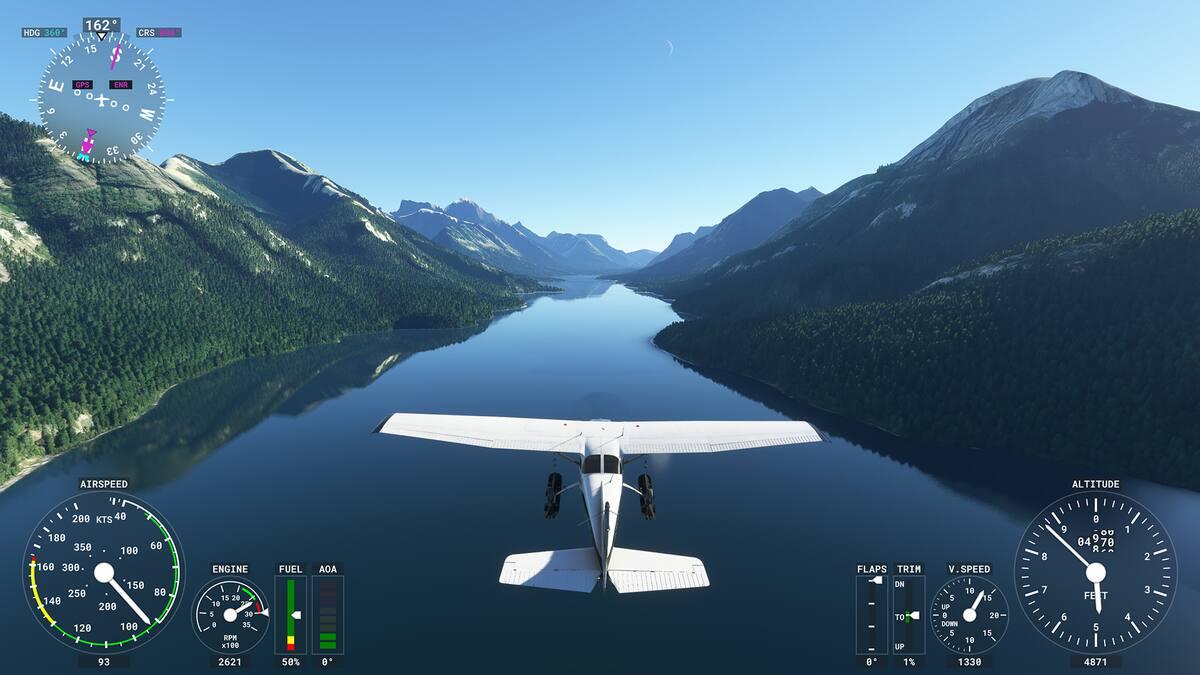
![[MSFS2024] Cessna 172 Skyhawk - Page 2 - Polls & Feedback - Microsoft Flight Simulator Forums](https://images.openai.com/static-rsc-4/0otGwyQnlKoXccaxoOv7JfD6jALXbn56asJB6iWtdPQuTy4ugq_Xvr4tZxZf14DohGR7yTwcyOgLU9sbw8F_txcDTRFB2B4npvbmNQjwb5QBYAPQ_pmpntT62MpcfXLwaIhIwYnRGbYHnmlQgtpWjwNONMUFk8-pmCMZtwUaMVI?purpose=inline)
8
Category: Simulation / Flight Training Game: Microsoft Flight Simulator 2024 Difficulty: Beginner Estimated reading time: 8–10 minutes
Have you ever dreamed of piloting an aircraft, exploring the world from above, or landing at a famous international airport? Microsoft Flight Simulator makes those experiences possible from your computer or gaming console.
But your first flight can feel overwhelming. There are instruments to understand, controls to master, and a runway waiting ahead.
This guide takes you from setting up your aircraft to completing your first takeoff, short flight, and landing.
1. Choose your first aircraft

Cessna 172 Skyhawk
The Cessna 172 is an excellent first choice. It’s a small, relatively forgiving training aircraft that lets beginners concentrate on controlling the airplane rather than managing complex jet systems.
Start with the G1000-equipped version if it’s available in your edition.
Avoid beginning with large passenger aircraft such as the Airbus A320 or Boeing 747. These are rewarding to fly, but their systems and procedures add unnecessary complexity to your first lesson.
2. Prepare the simulator
From the main menu, open Settings → Assistances and choose the All Assists preset. Microsoft’s beginner guidance confirms that this preset is designed for newcomers and can be customized later.
Microsoft Flight Simulator Support
+1
For a relaxed first flight, use these settings:
| Setting | Recommendation |
|---|---|
| Weather | Clear skies |
| Time | Daytime |
| Wind | Calm or light |
| Assistance | All Assists, customized as needed |
| Starting position | Runway |
| Aircraft | Cessna 172 |
| Camera | Cockpit |
Select Free Flight, choose an airport with a long runway, and position the aircraft at the runway start. Abu Dhabi’s Zayed International Airport (OMAA), for example, provides a recognizable location, although a quiet regional airport is easier for initial practice.
3. Understand the basic controls
Basic flight movements: pitch changes the nose angle, roll banks the aircraft, and yaw turns its nose left or right.
| Control | Function |
|---|---|
| Pitch | Raises or lowers the nose |
| Roll | Banks the aircraft left or right |
| Rudder | Controls yaw and helps maintain runway alignment |
| Throttle | Changes engine power |
| Flaps | Help the aircraft fly at lower speeds |
| Brakes | Slow the aircraft on the ground |
Use a gamepad, joystick, or flight yoke if available. A keyboard is possible, but fine adjustments are generally more difficult. Check the actual assigned controls in the simulator rather than assuming default key mappings.
4. Take off for the first time

With your aircraft already running and positioned on the runway:
- Check that the parking brake is released, and ensure the runway is clear.
- Smoothly increase the throttle toward full power.
- Use small rudder corrections to remain aligned with the runway centerline.
- Watch your airspeed increase.
- At approximately 55 knots in a typical Cessna 172 training configuration, gently raise the nose to lift off. The exact speed depends on aircraft configuration and conditions.
- Establish a steady climb without pulling back excessively.
Once airborne, make small adjustments. Sudden movements often cause beginners to overcorrect.
5. Learn to maintain level flight
Your first objective is not to fly fast or reach a great altitude. It’s to keep the aircraft stable.
Practice climbing to a safe altitude, leveling the wings, adjusting engine power, and using trim to reduce constant control pressure.
Focus on three primary instruments.

AirspeedHow fast you’re moving through the air

AttitudeAircraft pitch and bank relative to the horizon

AltitudeHeight indicated above mean sea level
These instruments provide the foundation for basic flight control.
Thrustmaster
6. Practice gentle turns
Once you can maintain level flight, practice turning the aircraft.
Apply a small bank, observe the heading change, and gradually return the wings to level when facing the desired direction.
Begin with shallow turns rather than sharp maneuvers. Watch your airspeed and altitude throughout the turn.
A useful exercise is to make a complete circle while staying near your initial altitude.
7. Prepare for your first landing

Landing is often the most challenging part of a beginner’s first flight, because speed, altitude, runway alignment, and descent rate all need attention.
Start with a long, straight approach and calm weather.
Reduce power to begin descending. As the aircraft slows, extend flaps in stages, staying within the aircraft’s permitted speed range.
Aim to approach the runway at a suitable landing speed for your Cessna 172 configuration—often around 60–70 knots during a typical training approach.
Keep the runway centered in front of you. As you reach the runway, gently reduce power and raise the nose slightly to flare, allowing the main wheels to touch down before the nosewheel.
Maintain directional control and brake smoothly once firmly on the ground.
If your approach becomes unstable, add power and try again rather than forcing a landing.
8. Common beginner mistakes
| Mistake | How to improve |
|---|---|
| Pulling back too sharply | Use gentle pitch inputs and monitor airspeed |
| Turning too aggressively | Start with shallow banks |
| Flying too slowly | Monitor speed and avoid excessive pitch-up |
| Approaching too high or fast | Stabilize the approach earlier |
| Overcorrecting | Use small, measured adjustments |
| Ignoring trim | Trim after establishing the desired attitude and power |
9. Your first-flight challenge
Beginner Pilot Checklist
0 / 5Configure clear weather and select the Cessna 172Take off and establish a steady climbMaintain level flight for two minutesMake a gentle left and right turnReturn to the runway and land safely
Reset challenge
10. What should you learn next?
After completing your first flight, gradually explore additional techniques such as airport traffic patterns, crosswind landings, navigation, basic radio communications, and more challenging weather.
Microsoft provides dedicated flight training and a New Flight Simmer Guide for those developing their skills.
Microsoft Flight Simulator
Watch a beginner flight tutorial

Cessna 172 G1000 – Beginner Flight Guide
A practical demonstration by Jonathan Beckett covering starting the aircraft, takeoff, flying a traffic circuit, and landing in Microsoft Flight Simulator 2024.
Final thoughts
Your first successful flight does not need to be perfect. Flying smoothly, maintaining a safe speed, making controlled turns, and returning to the runway are all achievements worth celebrating.
Start with a simple aircraft, practice in favorable weather, and increase the difficulty as your confidence develops. Before long, you’ll be exploring airports and landscapes around the world.
This guide is intended for flight simulation entertainment and learning, not as an operational procedure for flying real aircraft.
Website publishing package
Article metadata
Ready for editorial review
Suggested WordPress destination
games.bin3aiah.net
SEO title
Microsoft Flight Simulator: Your First Flight Guide (2026)
URL slug
microsoft-flight-simulator-first-flight-guide
Meta description
Learn your first flight in Microsoft Flight Simulator 2024, from aircraft selection and basic controls to takeoff, landing and beginner tips.
Suggested tags
Microsoft Flight Simulator, MSFS 2024, Flight Simulation, Cessna 172, Beginner Guide, Flying Games, PC Gaming
Featured image concept
Cessna 172 flying above a scenic coastline, photographed from behind and slightly above, with an elegant aviation-themed title overlay. Copy publishing metadata
Editorial status: Article prepared but not published. Screenshots and featured-image usage rights should be checked before uploading to WordPress.